How to Email Your Wedding Guests
You can email your full wedding guest list in under 10 minutes without spreadsheets, BCC, or a separate marketing tool. This guide covers when to email guests, what to write, which tools work best for weddings, and how to do it directly from your RSVP dashboard.
Quick Answer: Emailing Your Wedding Guests
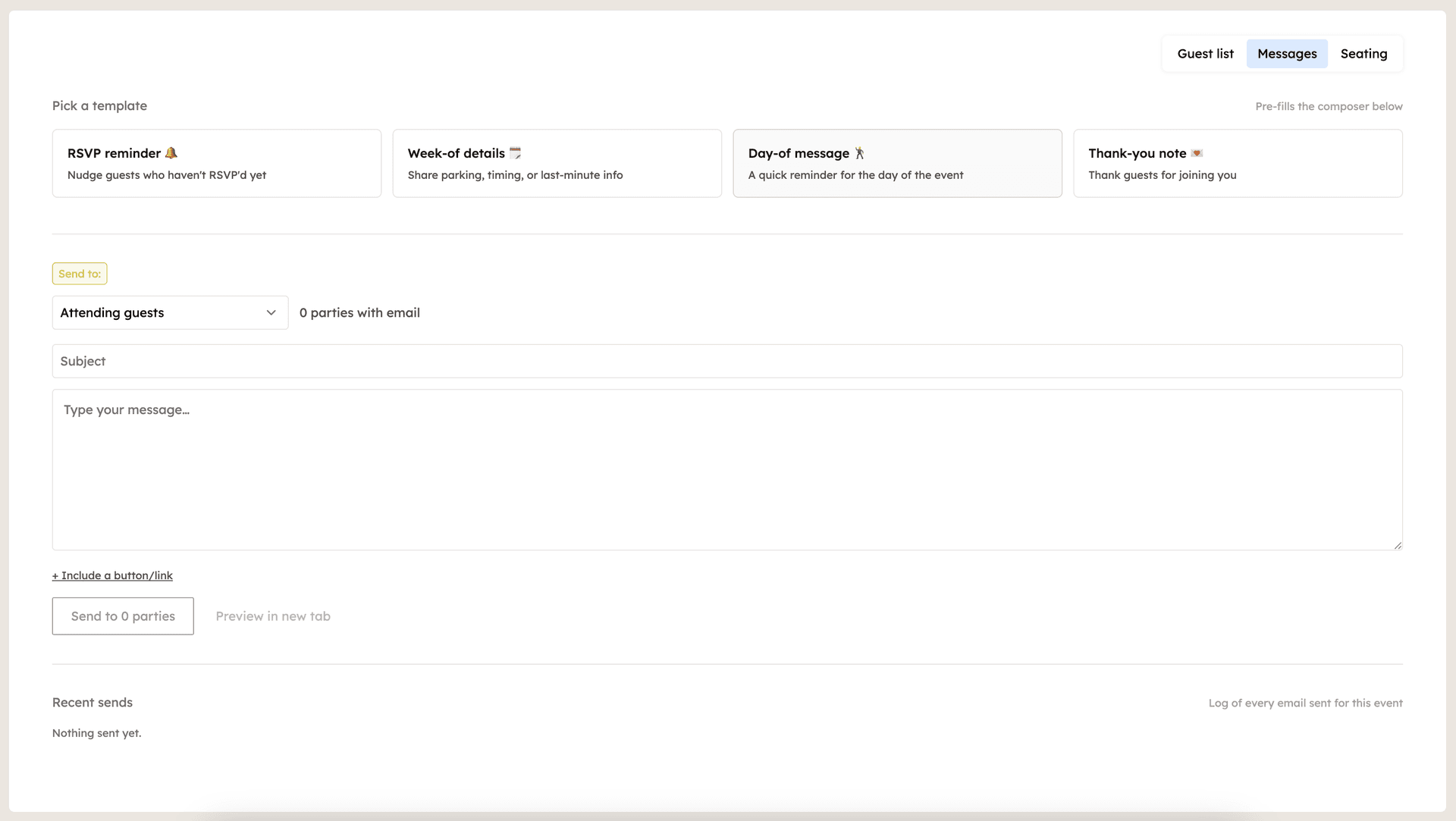
The simplest path is using an RSVP platform with built-in messaging, so the email list is already your guest list. Pick your recipients (all, RSVP'd, not yet responded), write a short subject and body, preview, send. For larger lists or richer campaigns, dedicated tools like Mailchimp work but require importing your list and managing two platforms. ouRSVP Pro includes email blasts for $15/month, no separate marketing tool required.
Why Email Your Wedding Guests?
Email is the single most reliable way to reach your guests between the invitation and the wedding day. Texting works for small groups, but it breaks down past 30 or 40 people. Phone calls don't scale. And the "announcement on the wedding website" approach only reaches the people who think to check.
A well-timed email gets your RSVPs in faster, reduces vendor coordination chaos, and prevents the "wait, what time is the ceremony again?" texts the morning of. It also gives you a chance to set the tone for the weekend before guests even arrive.
When to Email Your Wedding Guests (Timeline)
Most couples send between 3 and 5 emails total over the engagement period. Here's the typical timing:
Save the date confirmation (8 to 12 months out)
A short email after your save-the-dates go out, confirming you're excited to celebrate with them. Often includes the wedding website link.
RSVP link reminder (3 weeks before the deadline)
A direct nudge with the RSVP link. Send to everyone if it's the first reminder, or to non-responders only if you're already partway in.
RSVP deadline nudge to non-responders (1 week before)
A short, warm reminder to anyone who hasn't responded yet. Mention the deadline and the consequence (catering counts), no guilt-tripping.
Week-of details (5 to 7 days before)
Timing, dress code, parking, the venue address, transportation if you're providing it. This is the email people screenshot and reference all weekend.
Thank you note (2 to 3 weeks after the wedding)
A short thank-you to everyone who came. Often paired with a link to a photo gallery once the wedding photos are back.
What to Write (Templates)
Three templates that work for most weddings. Keep them short, specific, and end with one clear action.
RSVP reminder
Subject: A quick reminder to RSVP for Sarah and Michael's wedding
Hi friends and family,
Quick reminder that RSVPs are due by [date]. If you haven't had a chance yet, you can RSVP here: [link]. It takes about a minute.
Thanks for celebrating with us!
Sarah and Michael
Week-of details
Subject: Wedding week details inside
Hi everyone,
One week to go! Here's everything you need to know:
📍 Ceremony: 4:30pm at [venue]
👗 Dress code: [code]
🚗 Parking: [details]
🚐 Shuttle: [details]
Save this email; we'll be too busy crying happy tears to answer texts on the day. See you soon!
Sarah and Michael
Thank you note
Subject: Thank you (and a few photos)
Hi all,
We are still on a high from the wedding. Thank you for celebrating with us, for traveling, for the toasts, and for all the dance floor energy.
The full photo gallery is here: [link]. Pick your favorites.
With all our love,
Sarah and Michael
Send Wedding Emails with ouRSVP
If you're already collecting RSVPs through ouRSVP, the messaging tool uses your guest list directly. Here's the setup:
Upgrade to ouRSVP Pro
Messages are included in the Pro tier at $15/month. If you're on Basic, upgrade from your Settings page.
Open the Messages tab
From your event, click Messages. You'll see a composer and a recipient picker.
Pick your recipients
Choose all guests, only guests who've RSVP'd yes, only non-responders, or any subset. The recipient list pulls live from your RSVP data.
Write your subject and body
Short, specific subject. Open with the point of the email, end with one clear action (RSVP, save the date, see you Saturday).
Preview, test, and send
Send a test to yourself first to check formatting and links. Once it looks right, send to the full list.
Watch delivery status
See sends, opens, and bounces in the dashboard so you know who actually got the email.
What You Get with ouRSVP Pro Messages
💌 Built on your RSVP list
No separate guest list to maintain. Emails pull live from your RSVP responses.
🎯 Recipient filters
Email all guests, only those who've RSVP'd yes, only non-responders, or any subset.
📨 Real deliverability
Sends through Resend, so emails actually arrive (not stuck in BCC limbo).
📊 Open and bounce tracking
See who got the email and who didn't. Helpful before a deadline reminder.
✍️ Quick composer
No templates to learn or campaigns to configure. Subject, body, send.
🔁 Reply-to your own inbox
Guest replies come straight to you, so questions stay where you handle them.
Wedding Email Tips (From Real Hosts)
📬 Test by sending to yourself first. Check the subject, From name, formatting, and every link. Especially the RSVP link. A typo here means dozens of frustrated guests.
📆 Send Tuesday or Wednesday morning. Open rates are highest mid-week, before lunch. Avoid Friday afternoon and weekends; your email gets buried.
✂️ Keep it short. Three paragraphs max. Open with the point, give details, end with the action. Long emails get skimmed. Short emails get read.
🚫 Don't apologize for emailing. "Sorry to bother you" primes guests to feel bothered. Open with warmth and the reason for the email, no apology needed.
Wedding Email Tools Compared
Here's how the most common options stack up for weddings:
| Feature | ouRSVP Pro | Mailchimp | Gmail BCC | Constant Contact |
|---|---|---|---|---|
| Uses your RSVP list | Manual import | Manual | Manual import | |
| Filter by RSVP status | Manual tagging | Manual tagging | ||
| Deliverability | Strong (Resend) | Strong | Risky over 50 BCCs | Strong |
| Open and bounce tracking | ||||
| Built for couples | Marketing-focused | Generic | SMB-focused | |
| Price | $15/mo (RSVP + email) | Free to ~$20/mo | Free | $12+/mo |
The honest take: if you're already using ouRSVP for RSVPs, bundling messaging is the simplest path. If you have a larger list (500+) or want drip sequences, Mailchimp or Constant Contact have more depth but require maintaining a separate guest list. Gmail BCC works for under 50 guests and one-off emails, but deliverability gets dicey fast.
Frequently Asked Questions
What's the best way to email all my wedding guests at once?
It depends on what you need. If you're already collecting RSVPs through an online tool like ouRSVP, the built-in messaging uses your guest list directly, so you don't have to maintain a separate email list. For more advanced campaigns (analytics, drip sequences, templates), Mailchimp or Constant Contact have more depth but require importing your list and learning a separate platform.
Should I use BCC to email my wedding guest list?
BCC works for small guest lists (under 50) and one-off emails, but has real downsides for weddings. Many guests will land in spam, you can't personalize anything, and you can't see who opened the email. For a guest list over 50 or for sending multiple emails over the engagement period, use a dedicated tool with proper email infrastructure.
When should I email my wedding guests?
Most couples send 3 to 5 emails: a save-the-date confirmation (8 to 12 months out), an RSVP link reminder (3 weeks before the deadline), a deadline nudge to non-responders (1 week before), a week-of details email (5 to 7 days out), and a thank you after the wedding. Send each in the morning, mid-week, when open rates are highest.
How do I email only the guests who haven't RSVP'd yet?
If you're using a tool that combines RSVPs and email (like ouRSVP), you can filter recipients by RSVP status in the messaging interface. If you're using a separate email tool, manually filter your guest list spreadsheet and import only the non-responders to your campaign.
What should I write in a wedding RSVP reminder email?
Keep it short and warm. Open with a friendly nudge, include the RSVP deadline and a direct link to the RSVP form, close with a thank you. Three sentences plus the link is enough. Don't apologize or sound stressed.
Can I send wedding emails for free?
Yes. Gmail BCC works for small lists, Mailchimp has a free tier (up to 500 contacts), and Google Groups can work too. ouRSVP includes guest emails in Pro at $15/month, which also covers your RSVP form and seating chart. For most wedding hosts, bundling beats maintaining three separate tools.
How do I make sure my wedding emails don't go to spam?
Use a real email service (Resend, Mailchimp, ouRSVP, etc.) rather than BCC from a personal account. Avoid spammy subject lines (all caps, lots of exclamation marks, money symbols). Include a real From name. Test by sending to yourself first; if it lands in spam, adjust the subject and try again. Promotions tab is fine; only the actual spam folder is a problem.
How does ouRSVP Messages work?
Once guests RSVP through your ouRSVP form, their emails are collected automatically. From the Messages tab, compose a subject and body, pick your recipient segment, and send. ouRSVP handles deliverability through Resend, and you can see opens and bounces in the dashboard.
Related Guides
Ready to Email Your Wedding Guests?
ouRSVP Pro includes guest emails, recipient filtering, and delivery tracking. Built on your RSVP list. $15/month.
Get startedPro includes Messages + Seating. Basic ($5/mo) covers RSVP collection only.