How to Add an RSVP Form to Your Canva Website
Yes, you can add RSVP functionality to your Canva website. Using the ouRSVP Canva app, you can embed a fully customizable RSVP form directly into your Canva website design in under 3 minutes.
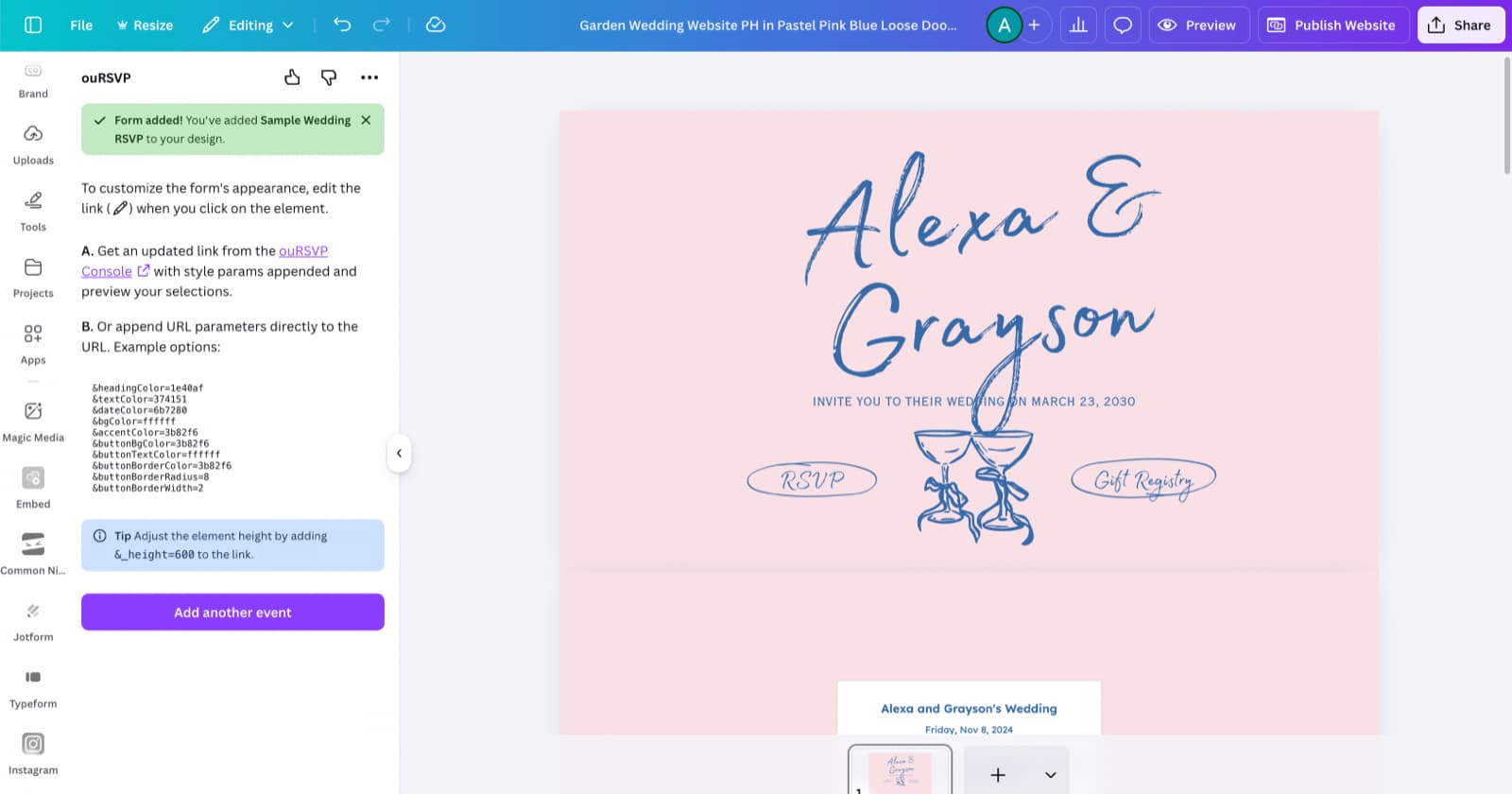
Quick Answer: Adding RSVPs to Canva
Canva doesn't have built-in RSVP functionality, but you can add it using the ouRSVP Canva app. Open your Canva website, click Apps, search for "ouRSVP", connect your account, and add the RSVP form to your page. It takes about 3 minutes and costs $5/month.
Why Canva Users Need an RSVP Solution
Canva has become incredibly popular for creating beautiful wedding websites. The drag-and-drop interface makes it easy to design something that looks professional without any coding knowledge.
But there's one thing Canva websites can't do out of the box: collect RSVPs. Canva's website builder doesn't include form functionality for guest management, meal selections, or plus-ones.
That's where the ouRSVP Canva app comes in. It's a native Canva integration that adds full RSVP functionality to your Canva website — no coding required, no external links, everything stays on your beautifully designed site.
What You'll Need
- →A Canva account that can publish websites (Pro, Teams, or eligible Free accounts)
- →A Canva website design (or create one from a template)
- →An ouRSVP account (you can create one during setup)
Step-by-Step: Add RSVP to Your Canva Website
Open Your Canva Website Design
Log in to Canva and open your website design. If you haven't created one yet, search for "wedding website" in Canva's template gallery to find beautiful starting points. Navigate to the page where you want your RSVP form to appear.
Find the ouRSVP App
Click "Apps" in the left sidebar (or press / to open the search). Search for "ouRSVP" or browse the app marketplace.
First time? You'll need to click "Use" or "Connect" to add the app to your Canva account. This only takes a moment.
Connect Your ouRSVP Account
The app will prompt you to sign in to your ouRSVP account. If you don't have one yet, you can create an account right from the Canva interface — it only takes a minute.
Once connected, you'll see your events. Select the event you want to use, or create a new one.
Add the RSVP Form to Your Page
Click to add the RSVP form element to your page. It will appear as a widget that you can drag, resize, and position just like any other Canva element.
Tip: Give the form plenty of vertical space. RSVP forms with multiple questions need room to display properly.
Customize and Publish
Use the ouRSVP dashboard to customize your form's questions and settings—these changes will appear when you republish.
Important: Applying Style Changes
The style playground is for previewing how your form will look — it doesn't automatically sync with your live form. Once you're happy with your styling, copy the updated Canva embed link from the snippet section and paste it into Canva to apply the changes.
When you're ready, click "Publish Website" in Canva. Your RSVP form is now live and collecting responses!
What You Can Do with ouRSVP on Canva
Collect Guest RSVPs
Guests respond directly on your Canva website. No external links or redirects.
Meal Selections
Let guests choose their meal preference and note dietary restrictions.
Plus-Ones
Allow guests to add additional attendees with their own details and meal choices.
Custom Questions
Add any questions you need — song requests, transportation, accommodations, etc.
Real-Time Dashboard
See responses as they come in. Track attendance, meal counts, and response rates.
Export Guest List
Download your guest list as CSV for seating charts, caterer counts, and more.
Tips for Canva Websites
Match Your Design
Use the ouRSVP dashboard to customize form colors to match your Canva design. You can adjust button colors, text colors, and accent colors.
Create a Dedicated RSVP Page
In Canva, add a new page to your website specifically for RSVPs. This gives the form plenty of space and keeps your other pages clean.
Test Before Sharing
After publishing, visit your Canva website and submit a test RSVP. Check that the form displays correctly on both desktop and mobile.
Use Canva's Navigation
Add a navigation link to your RSVP page so guests can easily find it from your homepage or other pages.
Troubleshooting
Can't find the ouRSVP app?
Make sure you're searching in the "Apps" section, not "Elements". The app should appear when you search for "ouRSVP" or "RSVP".
Form not appearing after publish?
Clear your browser cache and try viewing in an incognito window. Also make sure you selected an event in the app settings.
Form is cut off or too small?
Resize the RSVP element in Canva to give it more vertical space. Forms with multiple questions need more height to display fully.
Can't publish my Canva website?
Publishing websites requires Canva Pro, Canva Teams, or an eligible Free account. Check your Canva subscription status.
Style changes not appearing?
The style playground is for previewing only — it doesn't automatically update your live form. After making style changes, you need to copy the updated Canva embed URL from the snippet section and paste it into your Canva website. Then republish your site.
Question/setting changes not syncing?
Changes to questions and form settings in your ouRSVP dashboard should sync automatically. Try refreshing your Canva editor or republishing your website. Note: This is different from style changes, which require copying the new URL.
Frequently Asked Questions
Can you add an RSVP form to a Canva website?
Yes! You can add a fully functional RSVP form to your Canva website using the ouRSVP Canva app. The app integrates directly with Canva's website builder, letting you add RSVP functionality without leaving Canva.
Does Canva have built-in RSVP functionality?
No, Canva does not have built-in RSVP functionality for websites. Canva's website builder is great for design but doesn't include form features for collecting guest responses, meal selections, or plus-ones. Third-party apps like ouRSVP add this functionality.
Is the ouRSVP Canva app free?
The ouRSVP Canva app is free to install and connect. ouRSVP itself costs $5/month with no per-guest fees. This gives you unlimited RSVPs, guest management, meal selections, plus-ones, custom questions, and export functionality.
Do I need Canva Pro to add an RSVP form?
You need a Canva plan that can publish websites. Canva Pro and Canva Teams can publish websites. Some Canva Free accounts can also publish websites with limitations. The ouRSVP app itself works with any account that can publish.
Can I customize the RSVP form to match my Canva design?
Yes! ouRSVP forms are fully customizable. You can adjust colors, fonts, and styling in the ouRSVP dashboard to match your Canva wedding website design. The form will blend seamlessly with your aesthetic.
Can guests RSVP on mobile?
Yes, ouRSVP forms are fully responsive. Guests can RSVP on phones, tablets, or desktop computers. The form automatically adjusts to fit any screen size.
How do I see who has responded?
All responses appear in real-time in your ouRSVP dashboard at oursvp.app/console. You can view, filter, and export your guest list, track meal counts, and see response rates at any time.
Do playground style changes automatically sync to my live form?
No. The style playground is a preview tool — it lets you experiment with colors, fonts, and styling before applying them. Once you're happy with the look, you need to copy the updated Canva embed URL from the snippet section and paste it into your Canva website. Changes to form questions and settings (not styling) do sync automatically.
Canva Website RSVP vs. Other Options
Wondering how collecting RSVPs on Canva compares to other wedding website platforms?
| Feature | Canva + ouRSVP | The Knot / Zola | Canva alone |
|---|---|---|---|
| Custom design | Templates only | ||
| RSVP collection | |||
| Meal selection | |||
| Guest dashboard | |||
| Own your design | |||
| Price | $5/mo | Free (ads) | Free / Pro |
More than the RSVP form.
ouRSVP Pro adds two features beyond the embeddable widget: email your guest list directly from the dashboard, and build a drag-and-drop seating chart that syncs with your RSVPs. Both included for $15/month.
Related Guides
Ready to Add RSVPs to Your Canva Site?
Set up your event in minutes. Starting at $5/month. No per-guest fees, ever.
Get startedWorks with Canva, Squarespace, Wix, Webflow, and any custom site