How to Make a Wedding Seating Chart Online
You can build a complete wedding seating chart online in under an hour using a drag-and-drop seating tool. This guide walks through how to plan reception seating, what to consider for each table, and which tools fit different budgets, including a built-in option for couples already collecting RSVPs through ouRSVP.
Quick Answer: Building a Wedding Seating Chart
Wait until 2-4 weeks before the wedding for a stable RSVP count, then pick an online seating chart tool, add your tables, and drag guests to tables in natural groups. The fastest setup is using an RSVP platform with a built-in seating chart. Your guest list is already there, so you don't have to re-type names or meal selections. ouRSVP Pro includes a drag-and-drop seating chart with PDF export for $15/month.
Why You Need a Wedding Seating Chart
At a sit-down reception, free seating is almost always a bad idea. Guests stand around trying to find a spot, friend groups get split up, and the awkward late-arrival shuffle starts. A seating chart solves all of that in advance.
More importantly, a thoughtful chart makes the reception flow better. Tables full of guests who actually know each other have better conversation. Family dynamics get handled quietly instead of becoming a dance-floor issue. And your caterer knows exactly how many meals go where.
How to Plan Your Wedding Seating Chart (5 Steps)
Confirm your final guest count
Don't start seating until your RSVPs are mostly in. Most couples build the chart 2-4 weeks before the wedding, once the RSVP deadline has passed and you've chased the stragglers.
If you're using an online RSVP tool like ouRSVP, your final guest list (with meal selections, plus-ones, and dietary needs) is already sitting in your dashboard. That data flows straight into the seating chart.
Decide on your table layout
Ask your venue two things: how many tables they recommend for your guest count and which shapes are available. Most venues default to round tables of 8-10, which is the wedding standard for good reason. Round tables encourage conversation and don't leave anyone stuck at the end.
- Round (8-10 seats): classic, conversational, the safe choice
- Rectangular (8-10 seats): works for long tablescapes and dinner-party vibes
- Square (4-8 seats): intimate, modern, requires more tables
- Head table or sweetheart table: reserved for the couple (and often wedding party)
Group guests into natural clusters
Each table should feel coherent. Sort your full guest list into natural groups first, then assign each group to a table:
- Your immediate family
- Your partner's immediate family
- College friends
- Work friends
- Hometown / childhood friends
- Older family (aunts, uncles, family friends)
- Plus-ones who don't know anyone: try to seat them with their partner near friendly faces
Pro tip: a few cross-pollinated tables (mixing two groups) can spark new conversations. Don't over-engineer it. Most guests are happy to be seated with people they know.
Place the key people first
Start with the immovable placements, then work outward:
- Head or sweetheart table: the couple, sometimes the wedding party
- Parents' table: both sets of parents, grandparents, the officiant if you'd like
- Divorced or separated parents: often get their own tables with close family. Talk to them ahead of time to confirm what they'd prefer
- Older relatives: seat them away from the speakers and dance floor
- Guests with mobility needs: closer to the entrance, restrooms, and dance floor
- Kids: kids' tables for ages 6-12 if you have enough; younger kids stay with parents
Export, print, and share
Once the chart is finalized, export it to PDF. You'll share it with:
- Your venue and caterer: they need it to set tables, place meals, and prep service
- Your day-of coordinator: for trouble-shooting
- A printed display sign or escort cards: so guests know where to sit
Build Your Seating Chart with ouRSVP
If you're already collecting RSVPs through ouRSVP, the seating chart lives in the same dashboard. Here's the setup:
Upgrade to ouRSVP Pro
The seating chart is included in the Pro tier at $15/month. If you're on Basic, upgrade from your Settings page.
Open the Seating tab
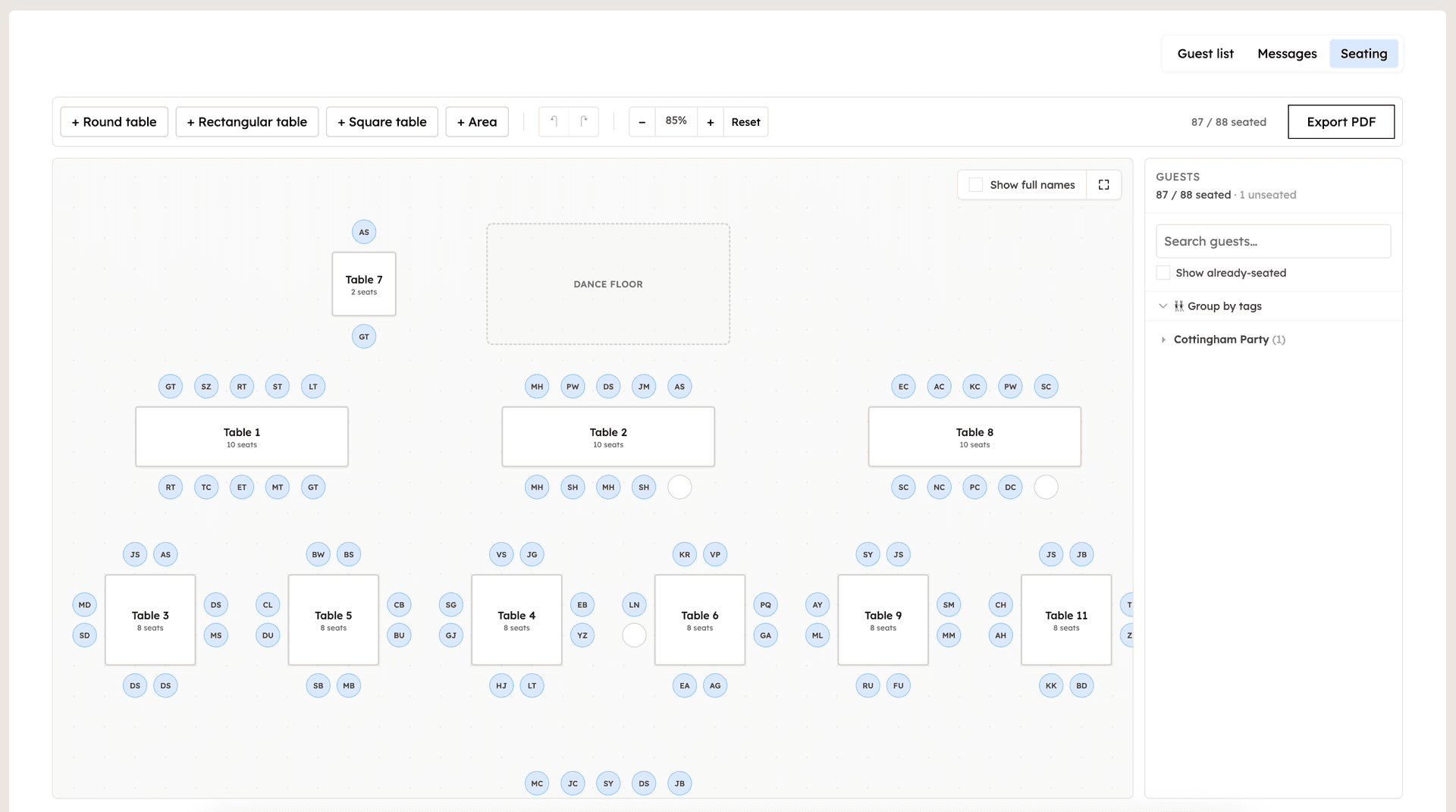
From your event, click the Seating tab. You'll see a blank canvas with a sidebar of all your RSVP'd guests.
Drop tables onto the canvas
Pick round, rectangular, or square tables. Resize and arrange to roughly mirror your venue layout.
Drag guests from the sidebar to tables
Guests are pulled live from your RSVPs. As you seat each one, the sidebar tracks who's seated vs. unseated so nobody gets forgotten.
Add areas (dance floor, head table, bar)
Areas are non-table elements like the dance floor or DJ booth. Drop them on the canvas to mock up the real reception layout for your venue.
Export to PDF
One-click PDF export with table numbers, guest names, and meal selections. Email it straight to your venue and caterer.
What You Get with ouRSVP Pro Seating
🪑 Drag-and-drop canvas
Round, rectangular, and square tables. Resize, rotate, and arrange to match your venue.
🔄 Synced with your guest list
Guests pulled live from your RSVPs. No re-typing names or meal selections.
✨ Areas for the dance floor + more
Add non-table elements (head table, dance floor, bar, DJ booth) to mock up your venue accurately.
📄 One-click PDF export
Export a clean PDF for your venue, caterer, or to print as a guest-facing sign.
📊 Seated vs. unseated tracker
Sidebar shows you who still needs a seat, so no one gets forgotten.
🍽️ Meal selections at a glance
Each guest's meal choice is visible on the chart, so caterers know exactly what to plate at each table.
Wedding Seating Chart Tips (From Real Hosts)
🪑 Leave 1-2 buffer seats. Late RSVPs and last-minute plus-ones happen. Building a tiny bit of slack into table sizes saves a major reshuffle.
💞 Don't hide the singles table. Mix single guests with friend groups instead of clustering them at "the singles table." The singles table trope is a guest-experience landmine.
🎤 Coordinate with your DJ and MC. Share the chart so they can pronounce names correctly during toasts and the dance announcements.
📋 Use the PDF as a backup, not the primary display. Print a poster-sized seating chart for the entrance, but bring the PDF on your phone too. Vendors often need to reference it on the fly.
Wedding Seating Chart Tools Compared
Here's how the most common seating chart options stack up:
| Feature | ouRSVP Pro | Canva templates | Excel / Sheets | AllSeated / dedicated |
|---|---|---|---|---|
| Drag-and-drop | Limited | |||
| Auto-syncs with RSVPs | Sometimes | |||
| Meal selections shown | Manual | |||
| PDF export | ||||
| Built for couples | Generic | Pro-leaning | ||
| Price | $15/mo (RSVP + seating) | Free / Canva Pro | Free | $30-100+ |
The honest take: if you're already collecting RSVPs online, a built-in seating chart wins on speed. If you need 3D venue mockups, a dedicated tool like AllSeated is more powerful but requires re-entering your guest list. Free options like Canva templates or Excel work for small, simple weddings but break down once you start moving guests around.
Frequently Asked Questions
What is the best wedding seating chart maker?
It depends on what you need. If you're collecting RSVPs online, ouRSVP's built-in seating chart wins on speed. Your guest list and meal selections are already there. If you need 3D venue views or floor-plan accuracy, dedicated tools like AllSeated or PerfectTablePlan have more depth but cost more and require manual guest entry.
When should I make my wedding seating chart?
Most couples build the chart 2-4 weeks before the wedding, once the RSVP deadline has passed. Start grouping guests earlier if you have complex family dynamics. Knowing roughly where everyone sits reduces last-minute scrambling.
How many guests can I fit per table?
Round tables typically seat 8-10 guests comfortably (10-12 max). Rectangular 8-foot tables seat 8-10. Smaller tables of 6 feel intimate but require more tables. Confirm your venue's table sizes before finalizing your layout.
Can I make a wedding seating chart for free?
Yes. Free Canva templates, Excel grids, and free tiers of paid tools all work for simple charts. The catch: free tools require manual guest entry and don't update when RSVPs change. ouRSVP Pro at $15/month includes a seating chart that syncs with your RSVPs automatically.
Should I assign guests to specific seats or just tables?
Most weddings assign guests to tables and let them choose their own seat. Reserved seats are usually only for the head table, parents' table, or guests with mobility/dietary needs. Assigning specific seats for everyone creates logistical headaches and slows down the reception.
What's the difference between a seating chart and an escort card?
A seating chart is one display (a poster or sign) that lists everyone's table. Escort cards are individual cards at the entrance with each guest's name and table number. Most weddings use one or the other. Seating charts are simpler logistics; escort cards feel more personal.
How does ouRSVP's seating chart work?
Once guests RSVP through your ouRSVP form, their names appear in the seating chart sidebar. You drag tables onto the canvas and drag guests to tables. ouRSVP tracks who's seated vs. unseated as you go. Add areas like the dance floor or head table to mock up the venue, then export to PDF when finalized.
Related Guides
Ready to Build Your Wedding Seating Chart?
ouRSVP Pro includes a drag-and-drop seating chart, synced with your RSVPs and exported to PDF in one click. $15/month.
Get startedPro includes Messages + Seating. Basic ($5/mo) covers RSVP collection only.